Most people size a portable power station by guessing — and guessing is how you end up with a battery that dies at 3 AM or a 60-pound unit you bought to charge a phone. The math itself is simple: watts × hours × days. What trips people up is the honest inputs — real running watts, a fridge’s duty cycle, the difference between a station’s rated capacity and what you can actually use. Our free Power Station Size Calculator does that math for you and recommends from the six stations our guides cover. This guide explains exactly how it works, how to get accurate numbers out of it, and how to read a result — including the result nobody wants, but everybody should trust: “no single station covers this.”
- The quick answer
- How the calculator works
- Step by step: running your first calculation
- Step zero: finding your device’s real watts
- The duty-cycle trap: fridges, sump pumps, and anything that cycles
- Worked examples: CPAP, fridge, and Starlink 24/7
- Reading your result: best fit, headroom, and no-fit
- Five sizing mistakes the calculator cannot fix for you
- Device-specific calculators
- Frequently asked questions
The quick answer
Add every device you plan to run, with its running watts and the hours per day it actually draws power, set how many days you want to go between charges, and the calculator totals your watt-hours and matches them against 85% of each station’s rated capacity — the share you can realistically use after inverter losses. One night of CPAP (60W × 8h) needs 480Wh, so a 768Wh station covers it. A full-size fridge needs about 1,500Wh a day once its duty cycle is counted honestly, which pushes you to a 2,048Wh station. If nothing in the lineup covers your load, the calculator says so instead of upselling you — and tells you roughly how long the largest station would last.
How the calculator works
The formula is the one from our manual sizing guide: watt-hours needed = watts × hours per day × quantity × days between charges. Two things make the calculator’s answer more honest than a back-of-envelope guess:
- The 85% rule. A station rated at 1,000Wh does not deliver 1,000Wh to your devices. Converting stored DC power to household AC costs energy, and batteries should not be run to absolute zero. The calculator sizes against 85% of rated capacity — so a 1,024Wh station is treated as roughly 870Wh of usable power. Any sizing method that uses the full rated number is flattering the battery.
- A fixed, curated catalog. It recommends only from six stations our guides cover in depth — EcoFlow River 2 Pro (768Wh), EcoFlow Delta 2 (1,024Wh), BLUETTI Elite 100 V2 (1,024Wh), Anker SOLIX C1000 (1,056Wh), Jackery Explorer 1000 v2 (1,070Wh), and EcoFlow Delta 2 Max (2,048Wh). That range spans the sizes most people actually need for outages, camping, and medical backup. If your load needs more than the biggest of them, the honest answer is a bigger class of machine or an expansion-battery setup — and the calculator tells you that rather than pretending a 2kWh box will do a 5kWh job.
Step by step: running your first calculation
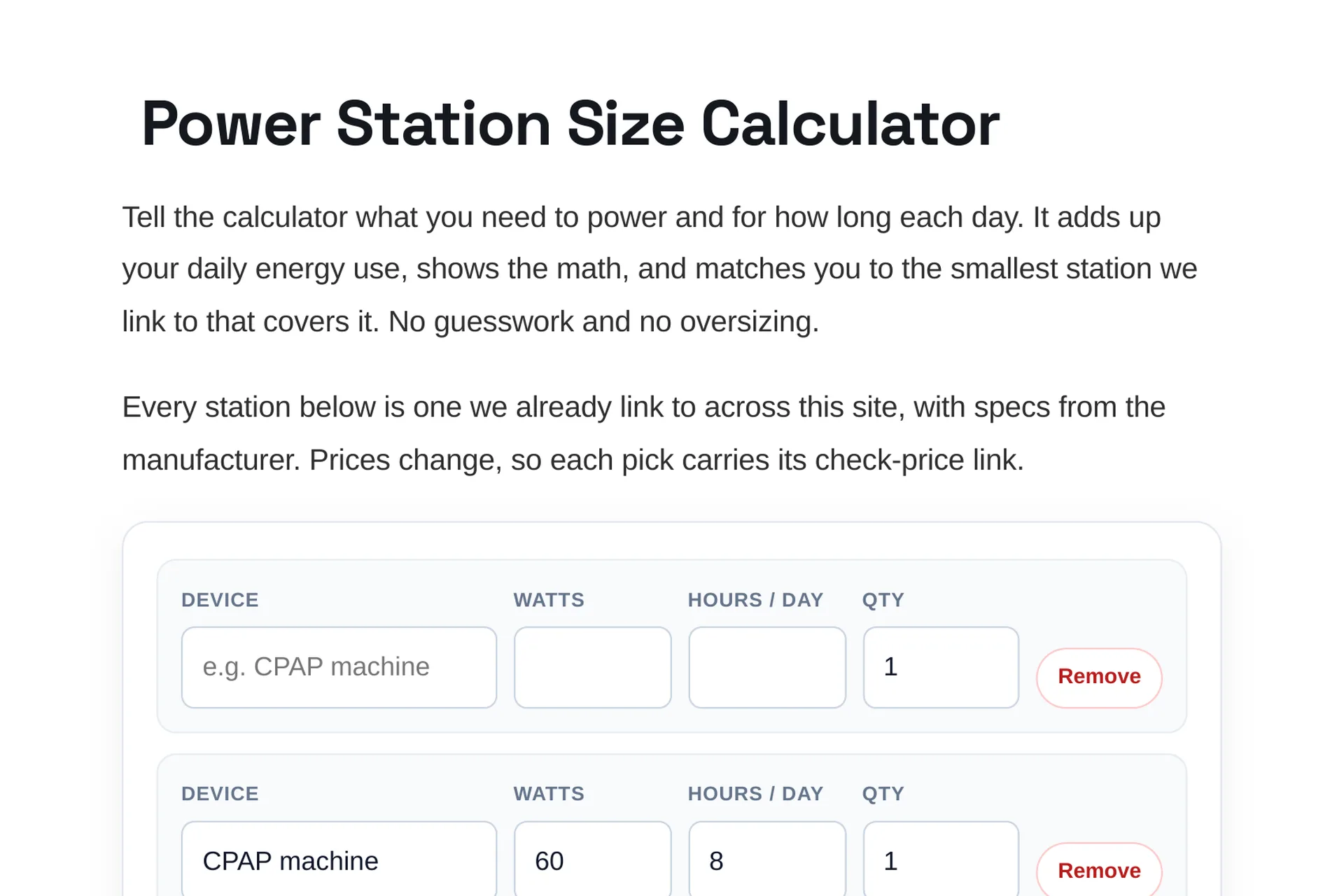
1. List devices, not rooms. “Keep the kitchen going” is not an input. A fridge, a Wi-Fi router, and two lights are. Use the quick-add presets for common gear or add rows manually.
2. Enter running watts. Not surge watts, not the marketing number on the box — the draw while the device works. The next section covers how to find it.
3. Enter honest hours. Hours per day the device actually draws power. A CPAP runs all night: 8 hours. A microwave runs in minutes: 0.5 hours covers a lot of reheating. A fridge is the special case — read the duty-cycle section before you type 24.
4. Set days per charge. One day means you can recharge daily (from a wall outlet, car, or solar). Three days means the station alone has to carry the load for a long weekend or a multi-day outage — watch how fast the required capacity climbs. It is supposed to; that multiplication is the single most useful reality check in power-station sizing.
5. Read the result. You get a best fit (the smallest station that covers you), a headroom pick (one size up, for the loads you forgot), or an honest no-fit with an estimate of how long the largest station would last.
Step zero: finding your device’s real watts
Garbage in, garbage out. Three ways to get a trustworthy watt number, best first:
- The label or manual. Almost every appliance has a rating plate listing watts or amps. Amps × 120 volts = watts for US household gear (a 1.3A device draws about 156W).
- Typical ranges for common loads. CPAP without heated humidity: 40–90W. Full-size fridge: 100–200W while the compressor runs. Starlink Standard: 75–100W; Starlink Mini: 25–40W. Wi-Fi router: 5–15W. LED lighting: 10W per bulb or string. Laptop: 45–65W. TV: 80–150W. Camping fan: 30–50W. Space heater: 1,500W on high — which is why heaters eat batteries, as our space heater runtime guide shows.
- A plug-in power meter. A meter between the wall and the device shows real draw, including how a cycling appliance behaves over an hour. It costs about as much as a pizza and removes all doubt. (We size from manufacturer specs and published ratings on this site, not from lab testing — a meter is how you verify your specific unit at home.)
The duty-cycle trap: fridges, sump pumps, and anything that cycles
Some devices are rated in watts but only draw them part of the time. A fridge’s compressor cycles on and off — a typical full-size fridge runs its compressor the equivalent of about 8–12 hours out of 24, depending on ambient temperature and how often the door opens. Enter 150W × 24h and the calculator will demand 3,600Wh a day and report no-fit. Enter the realistic 150W × 10h and you get 1,500Wh — covered by the 2,048Wh Delta 2 Max. Both answers are “correct”; the second one describes reality. Our refrigerator runtime guide walks through the fridge math in full.
The same logic applies to sump pumps (rated 800–1,300W, but they run in bursts totaling a few hours on a wet day) and well pumps. For anything that cycles, size by equivalent run hours, not clock hours — and always check the device’s starting surge against the station’s peak output separately, because a motor’s startup spike can be two to three times its running watts. Capacity decides how long; output decides whether it starts at all.
Worked examples: CPAP, fridge, and Starlink 24/7
One night of CPAP. 60W × 8h = 480Wh. Divided by the 85% usable rule, you need a station rated at least ~565Wh. Best fit: the 768Wh River 2 Pro, with room to spare for a phone charge. Run the same load for three nights without recharging (480 × 3 = 1,440Wh) and the recommendation jumps to the 2,048Wh Delta 2 Max — exactly the kind of jump people miss when they shop by one night’s math for a three-night trip. More in our CPAP backup guide.
A fridge for a day. 150W × 10h compressor-equivalent = 1,500Wh. Best fit: Delta 2 Max (2,048Wh rated, ~1,741Wh usable). Add a router (10W × 24h = 240Wh) and lights, and you are at the edge — the headroom pick exists for this reason, and beyond it you are honestly into 5kWh-class or expansion-battery territory.
Starlink around the clock. A Standard kit at 75W × 24h = 1,800Wh a day — more than any single station in the catalog delivers (the Delta 2 Max covers about 23 hours of it). Always-on loads are the quiet budget-killers; our dedicated Starlink calculator shows the 8-hour versus 24-hour math side by side, plus what solar input it takes to sustain it.
Reading your result: best fit, headroom, and no-fit
Best fit is the smallest — usually cheapest and lightest — station that covers your stated load with the 85% rule applied. Buy this if your inputs were honest and your load will not grow.
More headroom is one class up. Buy this if you rounded hours down, if a heat wave would keep the fridge’s compressor running longer, or if a second device is likely to join the list. Runtime you do not use costs money and weight; runtime you needed and did not buy costs a fridge full of food.
No-fit means your load exceeds the catalog’s biggest station (2,048Wh). That is information, not a dead end: the usual paths are a 5kWh-class unit, an expansion-battery system, splitting loads across two stations, or planning daily solar/vehicle recharging so “days per charge” drops back to 1.
Five sizing mistakes the calculator cannot fix for you
- Using surge watts as running watts. A fridge that surges to 1,200W at startup may run at 150W. Sizing capacity by surge triples your battery for no reason — surge matters for the station’s output rating, not its capacity.
- Typing 24 hours for cycling appliances. See the duty-cycle section. This is the most common oversizing error by far.
- Forgetting the always-on loads. Router, Starlink, a powered speaker on standby — individually trivial, collectively hundreds of watt-hours a day.
- Sizing for one night, camping for three. Days per charge multiplies everything. Set it to your real recharge interval.
- Ignoring output watts entirely. A microwave drawing 1,000–1,200W input will not run on a station with an 800W inverter no matter how large the battery behind it. Capacity is how long; output is whether at all.
Device-specific calculators
Some loads come up so often — and have enough quirks — that they get their own preloaded calculators on the same engine: the Starlink Power Station Calculator is live now, with refrigerator, CPAP, and sump pump versions arriving in November 2026. Each preloads realistic watts and hours for that device so you start from a sane default instead of a blank row. For everything else, the main Size Calculator plus this guide is the whole workflow.
Frequently asked questions
Is the calculator free? Yes — free, no signup, no email required. There is an optional email signup below the results if you want site updates; it never gates the answer.
Why does it use 85% of rated capacity? Because inverter conversion losses and sensible depth-of-discharge mean a 1,000Wh station delivers roughly 850Wh to real devices. Sizing against the full rating is how batteries die before morning.
Why only six stations? Because those are the models our guides cover in depth, across the 768Wh–2,048Wh range most buyers need. A calculator that recommends forty units it cannot vouch for is a store shelf, not a tool. If your load outgrows the six, the no-fit result points you to the right class of machine.
Does it account for solar recharging? Indirectly: “days per charge” is your recharge interval. If panels reliably refill the station daily, size for one day and let solar reset the clock — our solar generator guide covers panel sizing for a CPAP camping setup as an example.
What if my device shows amps, not watts? Multiply amps by 120 (US household voltage). A 1.3A fridge draws about 156W while running.
Should I just buy the biggest station I can afford? Only if portability does not matter to you. Every step up adds cost and pounds — the jump from a 768Wh unit to a 2,048Wh unit is roughly the jump from a lunchbox to a checked suitcase. Size to your load, add headroom if your inputs were guesses, and stop there.
Leave a Reply